 serverbastion.com

How to Configure a Dell PowerEdge R760 or R770
Configuration guide · Updated 2026-09-17 · 12 min read
If you have not yet chosen a generation, read the PowerEdge 14G-17G generations guide and the direct R770 vs R760 comparison first. Below we assume you are configuring a new 2U server — the PowerEdge R770 (17G, Intel Xeon 6) or the PowerEdge R760 (16G, 4th/5th Gen Xeon Scalable).
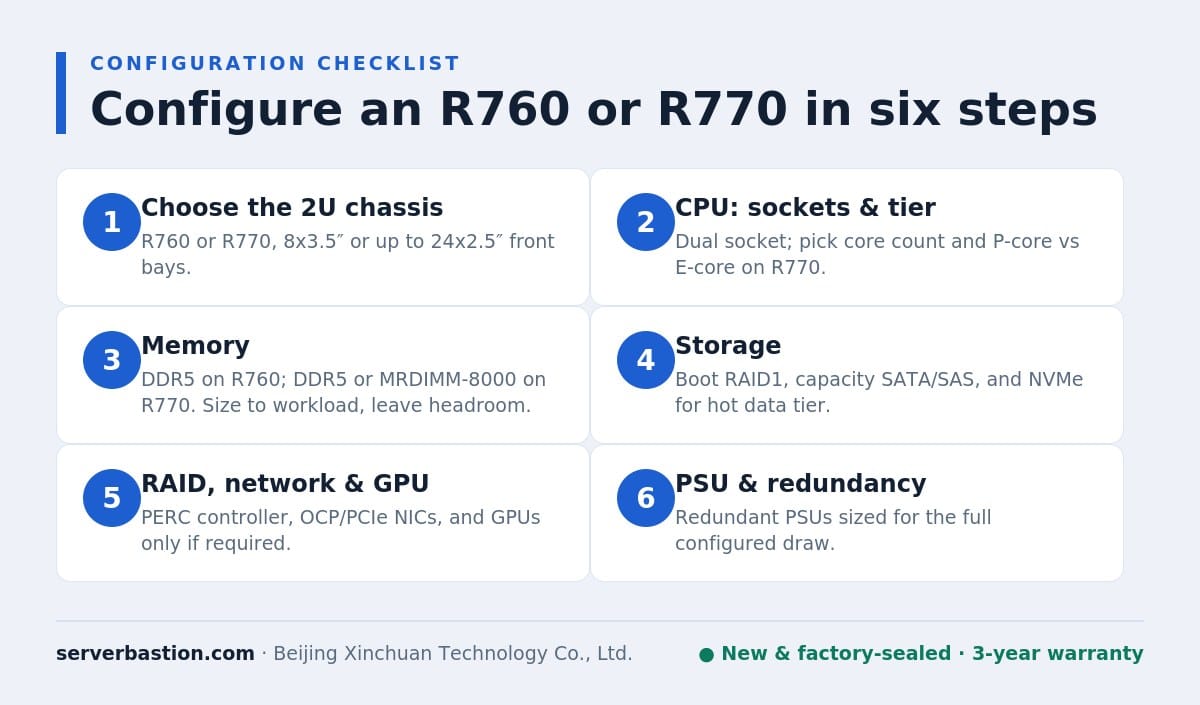
Step 1 — Choose the right 2U chassis
The full-size models are the general-purpose choice: both the R760 and R770 take dual CPUs, 32 DIMMs, up to 8 TB of memory, eight PCIe Gen5 slots and up to two double-width GPUs. Choose the value-oriented R760xs only when you do not need the full envelope — it is capped at 64 cores, 16 DIMMs, 2 TB and fewer slots in exchange for a lower price, which suits storage, streaming and single-purpose nodes.
| Need | Choose |
|---|---|
| Maximum cores, MRDIMM bandwidth, newest/longest-lived platform | R770 (17G) |
| DDR5 + PCIe Gen5 at the best price/performance | R760 (16G) |
| Storage/streaming node, ≤64 cores and ≤2 TB RAM | R760xs (16G value) |
| Lowest-cost new hardware, DDR4/Gen4 is acceptable | Sealed R750 NOS (see 15G) |
Step 2 — CPU: sockets and tier
Decide socket count first. A single CPU lowers cost and licensing exposure for smaller or clearly one-socket workloads; a second CPU adds its cores and opens the second set of memory channels and DIMM slots, so dual-socket is the default for virtualization and database hosts. Then set the tier:
- R770 (Intel Xeon 6): up to 86 P-cores per socket (172 in a dual system) on Granite Rapids, or up to 144 E-cores per socket on Sierra Forest for throughput-scale, density workloads. Use P-cores for general and latency-sensitive work, E-cores where core count and efficiency win.
- R760 (4th/5th Gen Xeon Scalable): Sapphire Rapids or Emerald Rapids, up to 64 cores per socket (128 total). The 5th-generation refresh is the natural pick on new R760 builds when available.
Avoid overbuying the top-bin SKU — a step-down in clock/core often saves meaningful money with little real-world effect on a well-loaded virtualization host. Give us your per-VM vCPU and RAM targets and we will fit the SKU to the workload.
Step 3 — Memory: DDR5 on R760, DDR5 or MRDIMM on R770
Both full-size 2U servers have 32 DIMM slots and an 8 TB ceiling. The R760 uses DDR5 RDIMMs at 4800 MT/s (4th Gen) or 5600 MT/s (5th Gen), with CXL 1.1 memory expansion supported. The R770 uses DDR5-6400 RDIMMs or MRDIMM at 8000 MT/s. Sizing reference:
| Use case | Typical starting memory |
|---|---|
| General virtualization / mixed workloads | 256-512 GB (8×32 GB or 8×64 GB RDIMM) |
| Database / consolidation | 1-2 TB (64 GB / 128 GB RDIMMs) |
| Heavy in-memory / max density | Toward 8 TB with 256 GB RDIMMs (32 DIMMs) |
| Bandwidth-sensitive on R770 | MRDIMM at 8000 MT/s |
Always populate DIMMs symmetrically across both CPUs (balanced across memory channels) to hit full bandwidth, and keep all DIMMs in a channel identical in size/speed. We will return a validated population map with any quote rather than a loose parts list.
Step 4 — Storage: boot, capacity and NVMe
Separate boot from data. A typical production build uses two small RAID-1 boot drives (or Dell BOSS) so the OS is independent of the data array, then dedicates the front bays to data. Front-bay and NVMe ceilings:
| Model | Front bays | Max NVMe | GPU (double-width) |
|---|---|---|---|
| R770 (17G) | 8×3.5 / 24×2.5 / 40x E3.S | Up to 44 NVMe | 2x GPUs (up to 450 W each) |
| R760 (16G) | 8×3.5 / 12×3.5 / 24×2.5 | Up to 24 NVMe | 2x GPUs (up to 350 W each) |
| R760xs (16G) | 8×3.5 / 12×3.5 / 24×2.5 | Up to 8 NVMe | Value/streaming role |
Pick NVMe for databases, cache/tier and high-IOPS VM storage; pick SAS/SATA for bulk capacity and backup targets. The 17G R770 adds the EDSFF E3.S form factor for higher NVMe density (up to 40 E3.S on the front); the R760 uses conventional 2.5-inch U.2 NVMe. We match the drive backplane to your choice at order time — the backplane cannot be freely swapped later.
Step 5 — RAID controller, networking and GPUs
- RAID: use a PERC hardware controller for SAS/SATA arrays; on 16G/17G the PERC 12 family (and PERC 13 on 17G) covers current NVMe-capable options. Tell us if you run vSAN/Ceph/software-defined storage, which often wants HBA/JBOD mode instead of RAID.
- Networking: both generations expose PCIe Gen5 slots, so choose 25/100 GbE OCP or PCIe adapters to match your ToR switches rather than over-specing. The R760 and R770 each provide eight Gen5 slots in the full 2U chassis.
- GPU: the R760 supports up to two double-width GPUs at up to 350 W each; the R770 supports up to two double-width GPUs at up to 450 W each. Larger multi-GPU builds use the dedicated accelerator chassis (R760xa/R770xa), not the mainstream 2U.
Step 6 — PSU and redundancy
Both servers ship with redundant PSU options. The R760 offers 800/1400/2400/2800 W and the R770 offers 1100/1500/2400/3200 W. CPU-only builds sit comfortably in the lower/mid tiers; two GPUs and many high-power NVMe drives move you to 2400 W or higher. We size the PSU to the exact worst-case BOM (CPU TDP + GPU + drives) so production systems stay redundant without paying for unused headroom.
Three example builds to copy as a starting point
These are illustrative configurations within official limits; exact SKUs and current pricing are confirmed per quote.
| Role | Platform | Core / memory / storage direction |
|---|---|---|
| Virtualization host | R760 | Dual 4th/5th Gen Xeon; 256-512 GB DDR5; 2x RAID-1 boot + 4-8 NVMe data; PERC; 25GbE; 1400/2400 W redundant |
| Database / in-memory | R770 | Dual Xeon 6 P-core; 1-2 TB DDR5-6400 (MRDIMM-8000 for bandwidth); all-NVMe (up to E3.S); PERC NVMe-capable; 2400 W+ |
| Storage / backup node | R760xs | Up to 64 cores; 128-256 GB DDR5; large 3.5-inch SAS/SATA capacity; HBA/JBOD for software storage; mid-tier PSU |
Need the lowest capital outlay for the virtualization profile? The same workload pattern maps onto a sealed PowerEdge R750 NOS (up to 80 cores and 8 TB DDR4, PCIe Gen4) with our 3-year backed warranty. Not sure how channel pricing and delivery compare with configuring direct? See the channel vs Dell direct notes and the full warranty terms.
Five configuration mistakes to avoid
- Mixing DIMM sizes or speeds across a channel. Unbalanced or mismatched DIMMs drop you to the slowest common speed and leave bandwidth on the table. Decide one capacity/speed per populated channel and fill symmetrically across both sockets.
- Choosing the backplane after the fact. SAS/SATA, U.2 NVMe and E3.S NVMe use different backplanes that are not freely field-swappable. Lock the storage media mix before the order is built; retrofitting NVMe later often means a new backplane, PERC and riser.
- Under-sizing the PSU for a GPU build. Two double-width GPUs plus high-core CPUs and many NVMe drives can exceed a mid-tier supply. We size to worst-case draw with redundant PSUs so a fully loaded node never trips on a single supply failure.
- Buying the top-bin CPU “just in case”. The highest-core or highest-frequency SKU carries a steep premium. On virtualization hosts, a slightly lower tier with the same core count target and more memory usually delivers better real value; license per-core where applicable and size to actual demand.
- Treating RAID and software-defined storage the same. vSAN, Ceph and similar stacks usually want HBA/JBOD passthrough, while classic VM and file workloads want a PERC RAID array. Picking the wrong controller mode causes rework at deployment.
When to look at the 1U or a previous generation instead
If rack units or cost are constrained, the same logic applies one rack unit down: the PowerEdge R670 is the 17G 1U with Xeon 6 and up to 40 E3.S drives, and the PowerEdge R660 is the 16G 1U with up to 128 cores and 8 TB. Choose 1U for dense, CPU-focused clusters without large GPU or maximum-bay requirements. If the budget matters more than having the newest platform, a sealed 15G R750 delivers up to 80 cores and 8 TB of DDR4 with PCIe Gen4 at a clear price step down and a 3-year warranty backed directly by Beijing Xinchuan Technology Co., Ltd. — read what New Old Stock means before you decide. Every path is brand-new or factory-sealed hardware; see why customers buy through us for pricing, verification and export documentation.
Frequently asked questions
Should I configure one CPU or two in an R760 or R770?
Start with one CPU only for light or clearly single-socket workloads; a second processor doubles available cores and also unlocks the second half of the memory channels and DIMM slots. For virtualization hosts, databases and GPU builds, dual CPUs are the standard choice. Tell us the workload and VM/core target and we will size the socket count so you do not pay for idle cores or memory channels.
How much memory should I put in an R760 or R770?
Both full-size 2U models accept 32 DIMMs and scale to 8 TB. A general virtualization host is commonly configured from 256 GB to 512 GB (for example 8×32 GB or 8×64 GB RDIMMs), database and in-memory workloads move to 1 TB-2 TB with 64 GB/128 GB RDIMMs, and dense consolidation uses the 256 GB RDIMMs toward the 8 TB ceiling. The R770 adds MRDIMM at 8000 MT/s when memory bandwidth, not just capacity, is the bottleneck. Populate DIMMs evenly across both CPUs for full memory bandwidth.
R770 MRDIMM or regular DDR5?
The R770 supports DDR5-6400 RDIMMs and MRDIMM at 8000 MT/s. Choose MRDIMM when the workload is memory-bandwidth sensitive (large in-memory databases, high-density virtualization, HPC-style and data-analytics builds) and you want the extra bandwidth per socket. Choose standard DDR5-6400 RDIMMs for general virtualization, storage and mixed workloads where capacity and price matter more than peak bandwidth. Both still cap at 32 DIMMs and 8 TB on the R770.
How many NVMe drives do I need and how do I configure RAID?
Choose NVMe for workloads needing the lowest latency and highest IOPS (databases, cache/tier, VM performance), and SAS/SATA for bulk capacity. The R760 supports up to 24 NVMe drives and the R770 up to 44 NVMe (including E3.S form factor on 17G). A common balanced build pairs two smaller RAID-1 boot drives (or a BOSS solution) with separate data drives; PERC hardware RAID handles SAS/SATA and, on NVMe-capable PERC models, NVMe arrays. Tell us the capacity and whether you want hardware RAID or software-defined storage and we will match the backplane and PERC.
What PSU should I select for a fully configured R760/R770?
Match the power supply to the worst-case draw of the CPU TDP, GPUs and NVMe count, and use redundant PSUs for production. The R760 offers 800/1400/2400/2800 W options and the R770 offers 1100/1500/2400/3200 W. General CPU-only builds run comfortably on the lower/mid tiers; two double-width GPUs or many high-power NVMe drives push you toward 2400 W and above. We configure the PSU tier to the exact BOM so it is neither under-spec’d nor wastefully oversized.
R770 or R760: which one should I actually configure?
Configure the R770 (17G, Intel Xeon 6) when you need the highest core count (up to 172 performance cores, or 288 with E-cores), MRDIMM-8000 bandwidth, the newest iDRAC10 platform and the longest support runway. Configure the R760 (16G, 4th/5th Gen Xeon Scalable) when you want DDR5, PCIe Gen5 and up to 128 cores and 8 TB at the better channel price. Both are brand-new with a 3-year manufacturer warranty; if budget dominates, the sealed 15G R750 NOS is the lower-cost alternative.
PowerEdge generations guide14G, 15G, 16G and 17G mapped
PowerEdge R760 details16G specs and availability
Request a configured quoteValidated BOM + firm channel price
Get a quote on new PowerEdge servers
Send us your workload, VM/core target, memory, storage, GPU and quantity. We will return a validated R760 or R770 BOM (with a sealed R750 NOS alternative if it fits) and a firm channel price and lead time.
Or email info@sell-server.com. New units ship factory-sealed with a 3-year manufacturer warranty; sealed previous-generation stock is clearly identified as New Old Stock.
Specifications reflect official Dell PowerEdge technical documentation for the 17th-, 16th- and 15th-generation rack servers and our internal configuration database. Dell, PowerEdge and Xeon are trademarks of their respective owners and are used for identification only. Servers are sold and warranted by Beijing Xinchuan Technology Co., Ltd.. This article was last reviewed on 2026-09-17.

WeChat
Scan the QR Code with wechat