 serverbastion.com

How to Choose an Enterprise Server: A 2026 Guide for Integrators
Start with the workload, then work down: CPU generation, memory, storage, networking, power, warranty. For most 2026 projects, a current 16th-generation Dell PowerEdge (R660/R760) is the safe default. Pay for 17G (R670/R770) only when you need a longer support runway or better efficiency. Buy factory-sealed NOS only from a supplier you can actually verify.
Who this guide is for, and how to use it
This is a working sizing and sourcing guide for system integrators, value-added resellers and project bidders who have to put a real server on a real bill of materials. It is not a spec race. The job is to match a platform to a workload, a budget and a multi-year support window without overbuying.
The examples run on Dell PowerEdge because that is the line we quote and know deepest. The same method works for any major x86 brand: swap the model names, then re-check every number on that vendor’s official spec sheet.
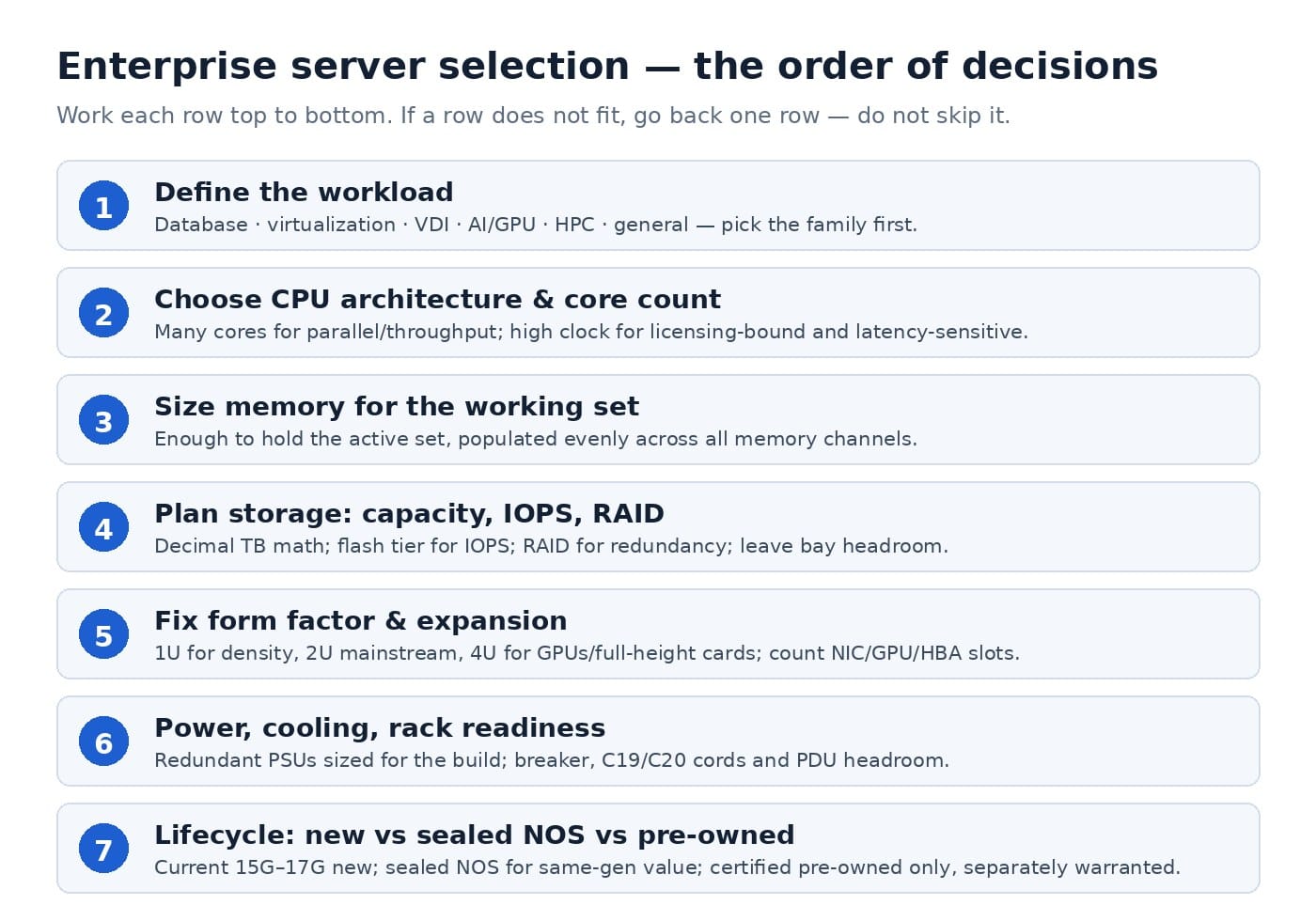
The order matters. Most bad purchases fail at step one, not step eight:
- Workload and growth
- CPU generation and core count
- Memory
- Storage, RAID and boot
- Networking (OCP vs PCIe)
- Power and redundancy
- Rack space, cooling and rails
- Warranty, lead time and shipping terms
- Lifecycle runway and spare-parts availability
- New vs factory-sealed NOS vs used — and who you trust
Step 1: Start with the workload, not the brand
Decide what the server actually has to do before you open any configurator. A “general-purpose” server sized on gut feel is almost always wrong in both directions: cores that sit idle, and a disk or NIC that becomes the bottleneck.
Put five numbers on paper before you shortlist hardware:
- The application and its licensing model. Per-core, per-socket or per-VM changes the whole build.
- Number of users, VMs, databases or concurrent jobs today.
- Expected growth over the platform’s life, typically three to five years.
- The data set: hot capacity, growth rate, and whether the load is random I/O or sequential.
- Availability requirement: a single node, a pair, or a cluster where one node can fail.
Common starting points for integrators:
| Workload | What usually dominates | Typical starting chassis |
|---|---|---|
| General virtualization (VMware/Hyper-V/Proxmox) | Balanced cores + memory | 2U dual-socket, R760 class |
| High-density VMs / VDI / many small workloads | Core count and memory bandwidth | 2U high-core, R770/R7725 class |
| Database (SQL Server/PostgreSQL/MySQL) | Memory, low-latency NVMe, per-core licensing | 2U with NVMe, R760/R770 class |
| AI inference / GPU acceleration | GPUs, power, airflow | Purpose-built GPU chassis, R760xa class |
| File, backup, surveillance, object storage | Drive bays and capacity/$, not CPU | Dense 2U, xd-style chassis |
| Edge and small-branch sites | Size, acoustics, simple support | Compact 1U or tower-class |
One discipline pays off: name the single bottleneck you expect in year three, and buy deliberate headroom there. Everywhere else only has to be adequate.
Step 2: Pick the CPU generation and core count
Buy the newest generation you can justify for a multi-year platform, but buy the core count the workload and its licenses actually need — not the biggest number on the sheet.
On official Dell specs, the current 2026 PowerEdge generations line up like this:
| Generation | Representative rack models | Intel options | AMD options | Memory | PCIe | Management |
|---|---|---|---|---|---|---|
| 15G | R450, R550, R650, R750 | 3rd Gen Xeon Scalable | EPYC 7002/7003 (AMD models) | DDR4 | Gen4 | iDRAC9 |
| 16G | R660, R660xs, R760, R760xa, R7625 | 4th/5th Gen Xeon Scalable (up to 64 cores) | EPYC 9004 | DDR5 | Gen5 (some Gen4) | iDRAC9 |
| 17G | R470, R670, R770, R6725, R7725 | Intel Xeon 6, up to 144 E-cores or 86 P-cores per processor | EPYC 9005 (up to 192 cores per processor) | DDR5, up to 6400 MT/s | Gen5 | iDRAC10 |
A few rules save integrators real money:
- Generation beats clock speed on a five-year horizon. A newer platform brings memory bandwidth, PCIe lanes, efficiency and a longer support runway. A current 16G or 17G server is easier to keep patched, expanded and resold years later.
- Cores are not free. Per-core database and virtualization licensing can make a 128-thread CPU cost more than the server underneath it. Match cores to the license, and compare per-core performance rather than the core total.
- E-core versus P-core is a real decision on 17G. High-count Xeon 6 efficient-core parts fit dense, throughput-style virtualization and scale-out. Performance-core parts fit software that leans on strong single-thread performance and large caches, including many licensed databases. “Most cores wins” is not a rule.
- Single-socket is a legitimate build. Entry 1U/2U single-socket designs cover a lot of branch and small-database work at a smaller license footprint.
- Intel or AMD is rarely a religious argument for a reseller. Decide from the application’s certification list, the customer’s standardization policy and your component supply. AMD models end in 5 (R7625, R7725).
If you remember one question, make it this: does the application scale across many cores, or do you pay for every core? That one answer settles most CPU arguments.
Step 3: Size memory the boring way
Buy enough RAM to keep the working set resident, populate the channels evenly, and leave one expansion cycle open — but do not pay for maximum DIMM density on day one.
- Current mainstream dual-socket 2U systems carry 32 DDR5 DIMM slots. Dell’s official R760 and R770 spec sheets list an 8 TB RDIMM maximum. Compact 1U designs go lower: the R660xs sheet lists 1.5 TB across 16 slots. Check the exact model.
- Spread memory across all channels instead of stacking a few large DIMMs. Balanced population protects bandwidth, and a half-populated system leaves you the cheap, simple upgrade later.
- Use registered ECC RDIMMs in rack servers. These mainstream PowerEdge platforms support registered ECC DDR5 only.
- Budget boot and hypervisor memory separately. It is easy to size “just the VMs” and forget the ESXi/hypervisor footprint and management agents.
Quick guidance: virtualization hosts usually run out of memory first. Plan per-VM headroom plus a maintenance buffer (roughly one spare host’s worth of capacity in an HA cluster). Databases want the hot data set in RAM. Neither case needs every slot filled on the invoice unless the project truly demands it.
Step 4: Choose storage, RAID and boot deliberately
Keep boot separate from data, match the drive tier to the I/O pattern, and never let the OS share a RAID set with production data.
- Boot: modern PowerEdge systems use a BOSS-N1 boot device with two M.2 NVMe SSDs in hardware RAID 1. It is cheap insurance and keeps the OS off your data backplane.
- Hot data (databases, virtualization, VDI): NVMe. On 16G/17G that increasingly means EDSFF E3.S Gen5 drives, with classic U.2/2.5-inch NVMe still common. The R760 supports up to 16 E3.S Gen5 drives on one backplane option; the R770 supports up to 32, and 40 in one front-plus-rear configuration, per its official sheet.
- Warm/capacity data: SAS/SATA SSDs for mixed use; nearline SAS or SATA HDDs for backup, file and bulk storage where cost per terabyte wins.
- Capacity math is decimal: 1 TB = 1,000 GB. A “240 TB” maximum on a spec sheet means 240 × 1,000 GB across all bays before any RAID overhead. Never quote 1,024-based math to a customer.
RAID controller choices follow the workload:
- Hardware PERC with flash-based cache protection (for example H965i/H975i) for general virtualization and databases that need write performance and protection.
- HBA/passthrough mode for software-defined storage (vSAN, Ceph, Storage Spaces Direct) that wants raw drives.
- External HBA when you expand to a JBOD or disk shelf.
Pick RAID for the failure profile: RAID 1/10 for performance and simple redundancy on small sets, RAID 5/6 for capacity with acceptable rebuild risk, and erasure coding or replication at the software layer for scale-out storage. Always specify hot-spares and a tested backup. RAID is redundancy, not a backup.
Step 5: Plan networking now — OCP 3.0 vs PCIe NIC
Choose the NIC form factor at purchase time: OCP 3.0 saves a riser slot and is the cleaner default on modern rack servers, so reserve PCIe slots for GPUs, HBAs and special adapters.
- A 25GbE OCP 3.0 card covers most modern virtualization and storage networks; 10GbE remains common at smaller sites.
- Go 100/400GbE only when the workload genuinely pushes it: storage clusters, AI, dense east-west traffic. Buying 100GbE “just in case” wastes money on optics and switches too.
- Modern 17G platforms such as the R770 and R7725 support dual OCP 3.0 plus multiple Gen5 slots, which keeps add-in slots free for acceleration.
- Confirm the split between LOM, OCP and PCIe add-in on the exact backplane/riser config. Not every combination is available on every chassis.
Rule of thumb: if a GPU or HBA might go in later, put networking on OCP and keep the PCIe slot open.
Step 6: Power and redundancy
Specify dual hot-plug PSUs sized for the fully loaded configuration — with GPUs and high-wattage CPUs counted in — not the entry configuration.
- Mainstream 2U servers span a wide PSU range. Official R760/R770/R7725 sheets list options from 800 W Platinum up to 3200 W Titanium depending on region and input voltage; the GPU-focused R760xa starts at 2400 W to feed up to four double-width accelerators.
- Redundant PSU mode lets one unit carry the load if the other fails. Size each PSU so the system survives a fault with the real cards and drives installed.
- GPUs, high-core CPUs and many NVMe drives move the wattage fast. Check the thermal and capacity budget on the exact configuration, not the base chassis.
- Titanium and high-line/200–240 V options matter in dense, power-sensitive racks; low-line 100–120 V feeds often cap the usable PSU options. Confirm the rack’s power distribution first.
Do not forget the rack itself: breaker capacity, C19/C20 cords for the big PSUs, and PDU headroom across the whole row.
Step 7: Rack space, cooling and rails
1U buys density and 2U buys flexibility; choose from expansion, GPUs, drive count and service access, then verify rack depth, airflow and cooling before you order.
- 1U (R660/R670 class): maximum compute density per rack unit, but fewer slots and drives and tighter thermal limits.
- 2U (R760/R770 class): the integration default — more drives, more slots, easier GPU and memory access, more airflow headroom.
- GPU/dense chassis (R760xa class): purpose-built airflow and power for up to four double-width accelerators. Do not force four GPUs into a general 2U that was never designed for them.
- Storage-dense (xd-style) 2U: a wall of 3.5-inch bays for capacity per dollar, with a deliberately modest CPU.
Cooling checks integrators remember only after the rack is full:
- Confirm rack depth fits the chassis with bezel and cable management (some 2U GPU configurations run well past 900 mm deep).
- Hot-aisle/cold-aisle containment, and raised-floor vs in-row cooling; high-TDP CPU and GPU builds raise inlet temperature risk.
- Direct liquid cooling (DLC) is optional on parts of the 16G/17G line, but it is a rack solution — it needs manifolds and a coolant distribution unit. Spec it only where the facility can support it.
- Order the correct rail kit (sliding ReadyRails with a cable-management arm for in-service racks; static rails for tight budgets) and confirm threaded vs square-hole racks.
Step 8: Warranty, lead time and shipping terms
Put warranty coverage and a realistic lead time in writing at quote stage, and treat both as commercial specifications, not afterthoughts.
- Brand-new servers are typically quoted with warranty in the range of about three years, subject to the supplier policy and the contract.
- Spare parts and brand-new enterprise storage systems (SAN/all-flash/hybrid) commonly fall under a separate supplier product policy, often around one year, fixed per contract — do not assume storage carries the same term as a server.
- Used/refurbished equipment, where offered, typically carries around one year, again per contract.
- None of this should be presented as a manufacturer’s official local warranty unless that coverage is documented. We quote coverage as an independent supplier and exporter on that honest basis.
Lead-time language wins or loses tenders. Ask for stated lead time by configuration, phased delivery for multi-rack rollouts, and written shipping terms. Our servers ship from China with worldwide delivery; exact delivery is agreed per project and destination. Do not assume local stock in your country — ask for the shipping origin and terms on the quote.
Step 9: Think in lifecycle years, not purchase day
The lowest invoice is rarely the lowest-cost platform; price the full support window — patches, parts and expansion — before you lock a generation.
- Patch and firmware runway: current platforms receive updates longer. A 17G server bought in 2026 has the longest runway; a 15G server has less, even when the price is attractive.
- Spare-parts availability: PSUs, fans, drives and RAID controllers must be obtainable for the platform’s whole life. Before standardizing a fleet, confirm the part ecosystem for that generation, not for a single unit.
- Expansion slots you will actually use: Gen5 slots and E3.S NVMe bays on 16G/17G keep the platform relevant as NIC and flash generations move on.
- Residual value and redeployment: mainstream current-generation 2U dual-socket servers are the easiest to redeploy or trade in three years later.
- Standardization beats a one-off bargain: one common model across a fleet cuts spare stock, training and imaging effort. A cheaper odd-ball chassis can cost more in year two.
We run a compatibility and part-number lookup for the PowerEdge line for exactly this reason: so integrators can confirm a PSU, NIC, RAID card or memory kit by part number before a rollout — see PowerEdge compatibility center and the part-number lookup.
Step 10: New, factory-sealed NOS, or used — and who do you trust?
Brand-new is the default for production and tenders; factory-sealed new-old-stock can be excellent value on an active generation when the supplier verifies it; treat used equipment as a separate, lower-tier decision with its own checks.
| Condition | What it means | Typical position | Warranty framing |
|---|---|---|---|
| Brand-new current gen | Latest production, full current platform | Default for production, tenders, long life | ~3 years, per policy/contract |
| Factory-sealed NOS | Unused, never-deployed, sealed older/newer stock | Good value on an active generation if verified | Server coverage per supplier terms, often comparable to new, per contract |
| Used / refurbished | Previously operated | Cost-driven, shorter-life projects | ~1 year, per contract |
NOS works only when trust is verifiable. As an integrator, ask for — and check:
- Factory-sealed packaging and serial numbers you can reconcile.
- Confirmation the unit was never deployed or returned.
- The exact warranty terms in writing, split by servers vs parts vs storage.
- A supplier that can also supply matching spare parts years later.
- A realistic shipping origin and lead time — global delivery from China, not an unsupported promise of local stock.
The risk is not the NOS concept. It is the seller. Verify the vendor and the serials, and NOS becomes a legitimate commercial tool. If the deal is structured as direct procurement from China under an export workflow, run the commercial side through a separate B2B sourcing and risk checklist — choosing the platform and managing the import are two different sets of risk.
Sizing cheat sheet: virtualization, database and GPU
Use these as starting rules, then validate against the application vendor’s own guidance.
- Virtualization: size the cluster for N+1, so one host can drop out during maintenance. Memory is usually the first constraint, then storage latency. Choose core count to avoid per-core license waste. A mainstream 2U dual-socket (R760/R770 class) with balanced DDR5 and NVMe or fast SAS SSDs is the standard building block.
- Database: keep the working set in memory, put redo/log/temp and data on the right latency tiers, and prioritize strong single-thread/per-core performance under per-core licensing. NVMe plus a cache-protected PERC (or validated external storage) is typical; confirm the database’s own storage certification.
- GPU/AI inference: start from a chassis engineered for the cards — the R760xa supports up to four double-width GPUs to 400 W per its official sheet — then size PSUs, airflow, CPU (GPUs need feeding, not max cores) and the network (inference clusters move real traffic). At 8-GPU training scale, move to a dedicated XE-class or rack-scale platform rather than forcing a general server.
The 10-point BOM checklist before you request a quote
- Workload named, with today’s load and three- to five-year growth.
- CPU generation and cores matched to licensing (E-core vs P-core settled on 17G).
- Memory: capacity, balanced channel population, one upgrade cycle left open.
- Boot separated on BOSS-N1 RAID 1; data tier chosen by I/O pattern.
- RAID/HBA mode matched to the storage architecture; spares and backup defined.
- Networking: OCP vs PCIe decided, speed matched to the fabric and optics.
- Dual PSUs sized for the fully loaded system; rack power and cords checked.
- Chassis (1U/2U/GPU/dense) matched to bays, slots, depth and cooling.
- Warranty and lead time written per server/storage/parts, shipping origin confirmed.
- Lifecycle: patch runway, spare parts and fleet standardization verified.
Frequently Asked Questions
What is the best server to buy in 2026 for a small integration project?
For most general virtualization and mixed-application projects, a current 16th-generation dual-socket 2U — the Dell PowerEdge R760 class — is the safe default: DDR5, PCIe Gen5, broad storage options and a long support window. Step down to a compact 1U like the R660/R660xs class for space-constrained sites, and up to 17G (R770 class) only when you need the longer runway or efficiency. Size from the workload, not from a “best server 2026” list.
How many CPU cores do I actually need?
Enough to run the workload at target utilization with headroom — a sensible plan leaves spare room instead of running flat out — and no more than the per-core licensing can justify. High-count E-core Xeon 6 and high-core EPYC parts suit dense scale-out and virtualization; strong P-core parts suit licensed databases and single-thread-sensitive software. Cores the application cannot use are pure license cost.
How much RAM should an enterprise server have?
Enough to hold the virtualization or database working set with headroom, populated evenly across memory channels. Mainstream 2U dual-socket 16G/17G systems support up to 8 TB of RDIMM on Dell’s official R760/R770 sheets, but most projects need far less. Buy what you use, keep a planned expansion path, and skip the day-one max-out.
Is new-old-stock (NOS) server equipment reliable?
Factory-sealed NOS can be as reliable as new because it was never used or deployed — but only when the seller verifies sealed packaging, serial numbers, written warranty terms and future parts supply. The vendor is the risk, not the NOS concept. Confirm coverage split by servers vs storage vs parts, plus shipping origin, in the contract.
What warranty and shipping terms should a reseller put in writing?
Three things. First, the warranty term by product type: brand-new servers typically around three years; storage systems and spare parts often around one year under separate supplier policy; used equipment around one year — all per contract. Second, no claim of a manufacturer’s official local warranty unless it is documented. Third, stated lead time and shipping origin: servers ship from China with worldwide delivery to the agreed destination.

WeChat
Scan the QR Code with wechat